
Google Just Put Preferred Sources Inside AI Overviews. Here's How to Get Picked
Google now ships an official Preferred Sources button you embed in two lines of HTML. Here is what changed in August 2026 and how to get readers to pick you.
Published Updated 15 min read

Founder, GrowthMarketing.ai
15+ years of experience
Emre Elbeyoglu is a B2B SaaS growth expert and Founder of GrowthMarketing.ai. With 15+ years of SEO and GEO experience, he studies search and AI ranking systems to support growth work for brands including Rakuten and Investing.com. He has also bootstrapped SaaS products including Popupsmart and LiveChatAI.
- Computer Technology & Information Systems, Bilkent University
- Co-founder & Growth Lead, Popupsmart (since 2019)
- Co-founder, LiveChatAI (since 2023)

Share article
Explore with AI
On May 27, 2026, Google quietly handed publishers a new lever over AI search: readers can now name the sites they trust, and those sites get badged and surfaced inside AI answers. Google says a chosen source gets clicked roughly twice as often.😱 Most site owners still don't know it exists.
Three months later, Google removed the last excuse not to ask for the pick. There is now an official button you drop into your page in two lines of HTML.
Here's what changed, and the fastest way to get picked.
Update, August 20, 2026: there is now an official "Preferred Sources" button. Google released an embeddable button that adds your site as a preferred source and drops the reader back where they left off on your page. People have now selected more than 600,000 unique sources — up from 345,000 in May. The button code lives in Search Central.
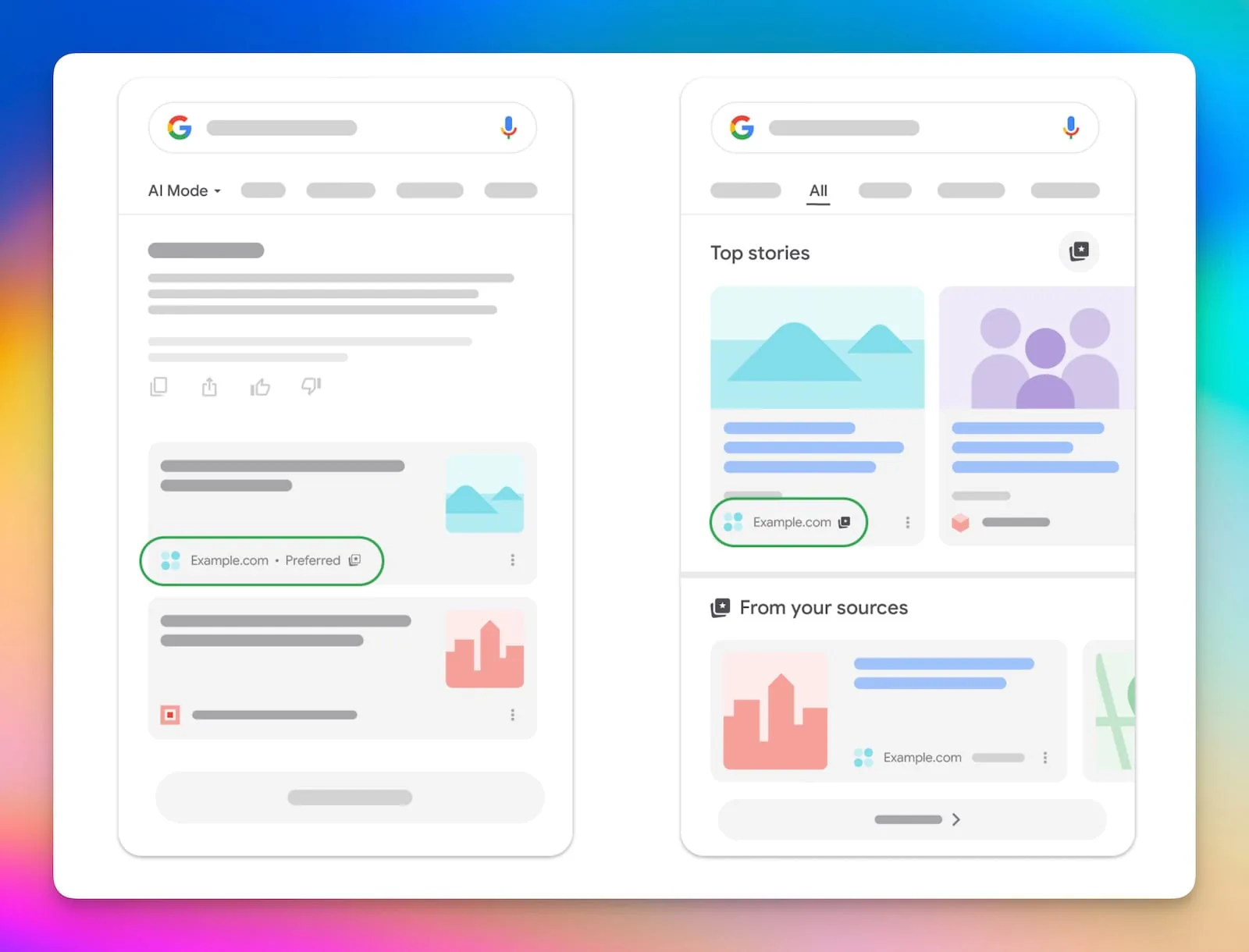
If you run a site and you've watched AI answers eat your search traffic for two years, this is the rare update that runs the other way. It doesn't depend on a new algorithm guessing whether your content is good enough. It depends on the one group already on your side: your readers.
Here's the news, why it matters more than it looks, and how to turn your audience into a one-tap Google advantage today.
What "Preferred Sources" actually is
Preferred Sources is a Google Search setting that lets a reader pick the sites they want to see more of. Once someone chooses you, your fresh articles show up more prominently for them — and carry a visible "preferred" badge so they're easy to spot.
It launched in Top Stories in the US and India in August 2025, then went global across all languages in April 2026. By that point, picks had climbed from roughly 90,000 sources to a much larger base.
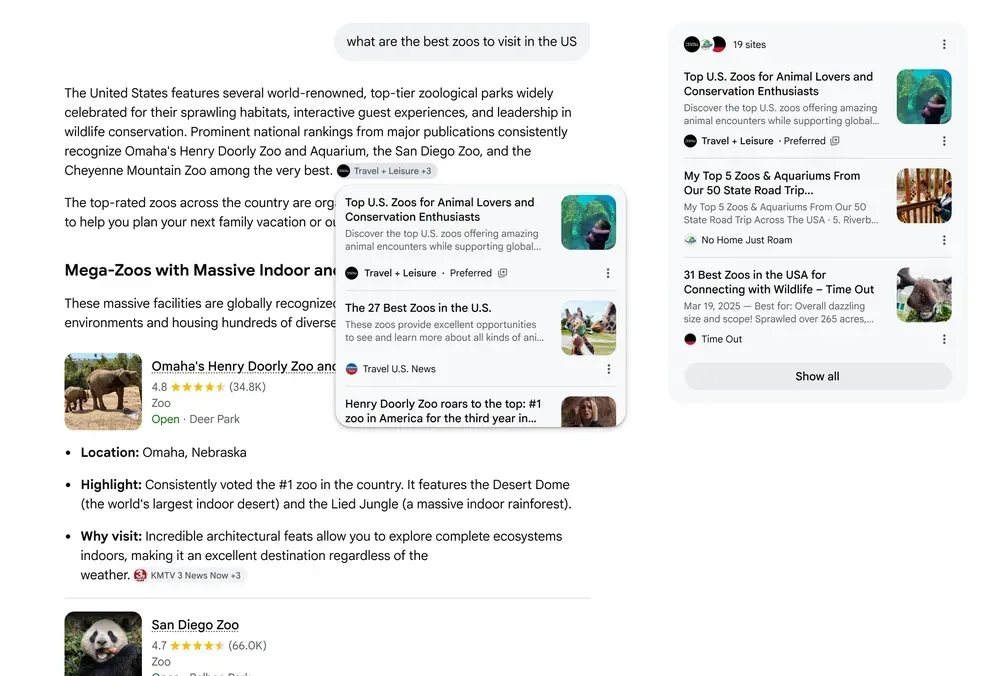
Then came the part that changes the math. On May 27, 2026, Duncan Osborn, a Product Manager on Google Search, announced that Preferred Sources is moving into AI Overviews and AI Mode the AI-generated answers that increasingly sit on top of the results page before the blue links. Google said readers had by then selected more than 345,000 unique sources, and that people are about twice as likely to click through to a link from a source they've preferred.
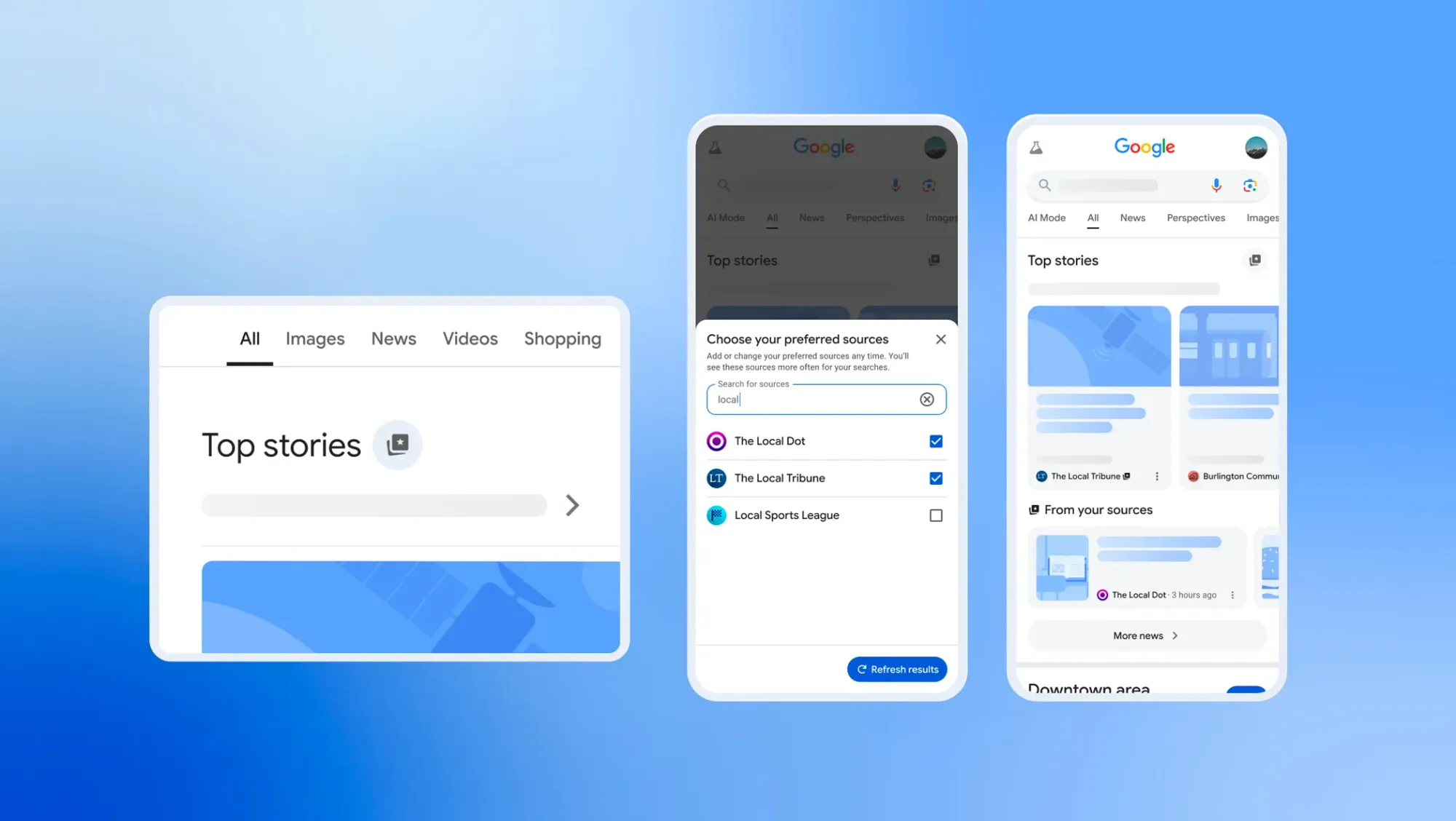
One more detail most coverage buried: a pick follows the reader everywhere. Choose a site in Top Stories and it also shapes that reader's AI Mode and AI Overviews. Choose it in Search settings and it shapes Top Stories too. One tap, every surface.
What changed on August 20, 2026
Mrinalini Loew, General Manager of the Google Search Ecosystem, announced three personalization changes. One of them is yours to act on:
- An official Preferred Sources button. Two lines of HTML render a Google-styled, auto-translated button. A reader taps it, your site is saved, and Google sends them straight back to the spot they were reading — no detour through Search settings, no lost session.
- A much bigger base of picks. More than 600,000 unique sources have now been selected, up from 345,000 in late May. Adoption nearly doubled in twelve weeks.
- Discover takes plain-language instructions. In the Google app, tapping the three-dot menu on a feed card lets a reader type what they want more or less of, in their own words — "kitchen reno ideas, eco-friendly only." The feed adjusts on the fly and remembers the request.
- Audio briefings become curated. In the Google News app on Android, daily audio briefings can be tuned by topic, with source attribution and links out to the full article.
The Discover and audio changes are reader-side controls you can't influence directly. The button is the one that lands in your codebase this afternoon.
Why this is bigger than a Top Stories tweak
Two numbers explain the stakes.
The first is Google's own: 2× the clicks for a preferred source. Read that as a benefit, not a stat — for the same article, in the same answer, a reader who picked you is twice as likely to come to your site instead of a competitor's.
The second is scale. AI Mode passed one billion monthly users as of May 2026, and Google has been steadily making AI-generated answers the default search experience. So a feature that decides which links get badged and lifted inside those answers now operates at the scale of search itself. Visibility inside the AI answer is no longer a side surface — for a growing share of queries, it is the surface.
Put together: one reader action, applied across the exact place attention is moving.
A fair caveat, because honesty sells better than hype: these are Google's figures, and Google hasn't published independent verification of the click lift or the adoption count. Being preferred also doesn't guarantee placement — Google's John Mueller has clarified the feature works alongside ranking systems, not on top of them. It tilts the odds toward you with the readers who already chose you. It doesn't suspend the rules. For most sites, tilting the odds with your most loyal audience is exactly the edge worth having.
Where you show up once readers pick you
- Top Stories. Pick you once, and Google surfaces more of your fresh articles in the Top Stories carousel — each marked with the "preferred" badge readers recognize. This runs globally, in every language Google Search supports.
- AI Mode. Inside Google's AI Mode answers, your links can carry the same badge for the readers who chose you — so you appear where the AI does the answering.
- AI Overviews. In AI Overviews, links from a reader's preferred sites get flagged, keeping your brand inside the answer instead of buried below it.
The AI surfaces follow their own rollout: Google says preferred sources can appear in AI Mode and AI Overviews in every language and locale where those two features are live. Same single choice. Classic search and AI search, covered at once.
First, check whether your site is even in the picker
Open Google's source preferences tool and type your site into its search box. If it comes back, you're eligible and every method below will work. If it doesn't, none of them will — the button and the deeplink both hand off to this same picker.
Two eligibility rules catch people out:
- Matching happens at the domain or subdomain level.
example.comandnews.example.comqualify.example.com/blogdoes not — a section of a larger site can't be preferred on its own. - Sites that rarely publish tend not to appear. The feature is built around fresh content, so a dormant domain may simply be missing from the picker.
The fix Google shipped: an official button in two lines
This is the method Google now recommends, and it's the one to use unless your stack makes it impossible. It renders a localized, Google-styled button, and when the reader taps it they're returned to your page rather than left sitting in Search settings.
Add the library, ideally in your <head>:
<script async src="https://news.google.com/swg/js/v1/publisher.js"></script>
Then drop the button wherever you want it to appear:
<div google-add-preferred-source-btn></div>
That's the whole implementation. The button picks up the reader's browser language on its own. Two optional attributes cover the rest:
<div google-add-preferred-source-btn data-theme="dark"></div>
<div google-add-preferred-source-btn data-lang="en"></div>
data-theme takes light (the default) or dark. data-lang takes a language code and overrides the browser default — useful on a single-language site whose readers browse in a mix of locales.
If you need the flow bound to your own UI instead of Google's badge, the library exposes a JavaScript SDK. Load it with preferred-sources-control="manual" so it doesn't auto-render, then call it yourself:
import { preferredSource } from "https://news.google.com/swg/js/v1/publisher.mjs"

preferredSource.init({ theme: "light", lang: "en" })

document.querySelector("#myButton").onclick = () => {
  preferredSource.addPreferredSource()
}
There's a matching callback-queue version (self.PREFERRED_SOURCE) for plain script tags. Both expose the same methods, so pick whichever matches your build.
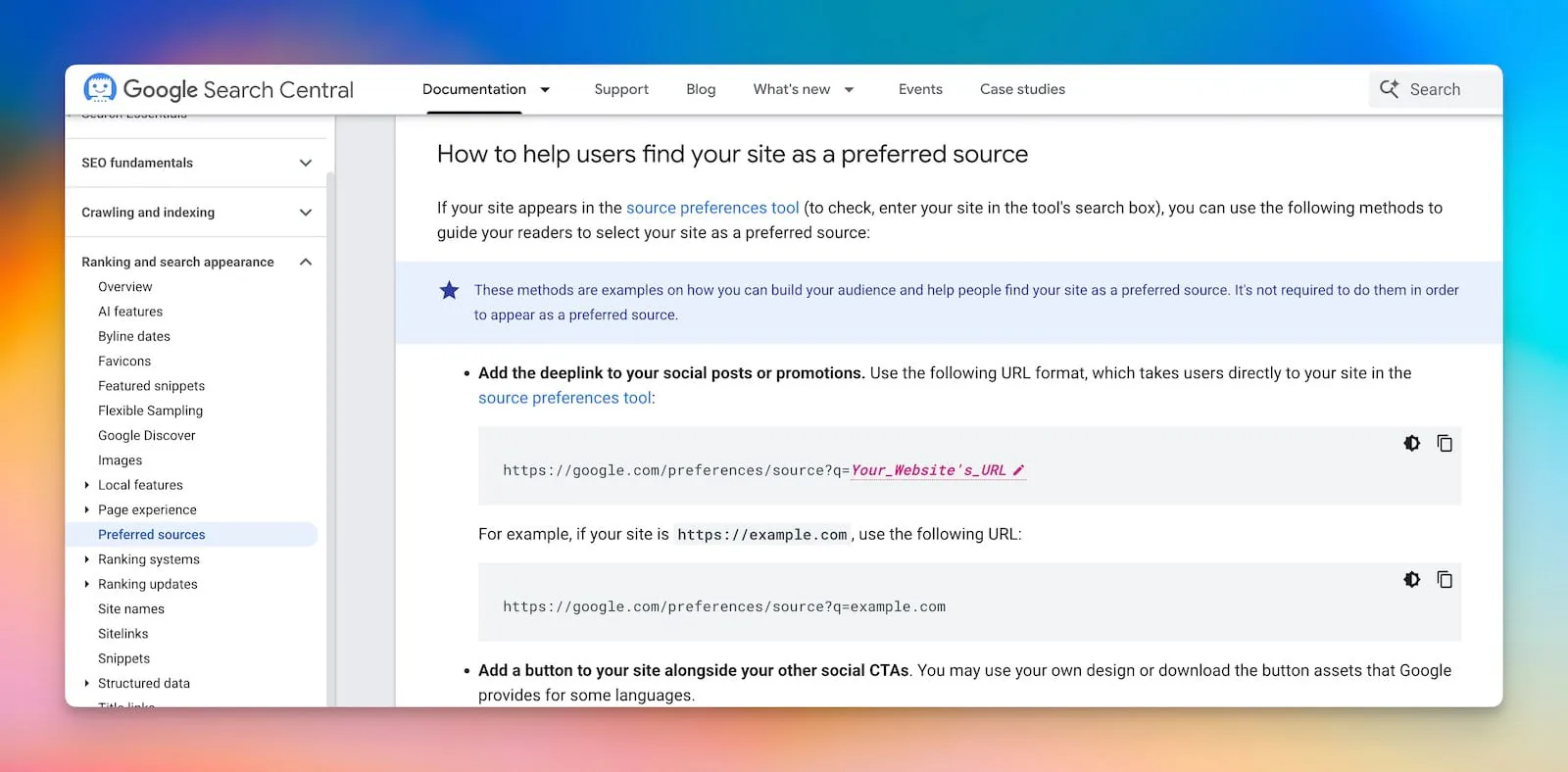
No JavaScript? The deeplink is still officially supported
Google documents a fallback for exactly the case where you can't run the script — a locked-down CMS, an AMP-ish template, an email newsletter, a social post. Point people at the picker with your domain pre-loaded:
https://www.google.com/preferences/source?q=example.com
Swap in your own domain, and the reader lands on your entry in the tool with one confirmation left to make. It works as a text link, as a clickable image, or pasted into a newsletter — anywhere a script tag can't go. Google also publishes official badge artwork in every supported language if you want the deeplink to look like the real thing.
Worth being clear about the trade-off: the deeplink sends the reader to Google and leaves them there. The JavaScript button brings them back to your article. That difference is the whole reason to prefer the script when you can run it.
Where a generator still helps
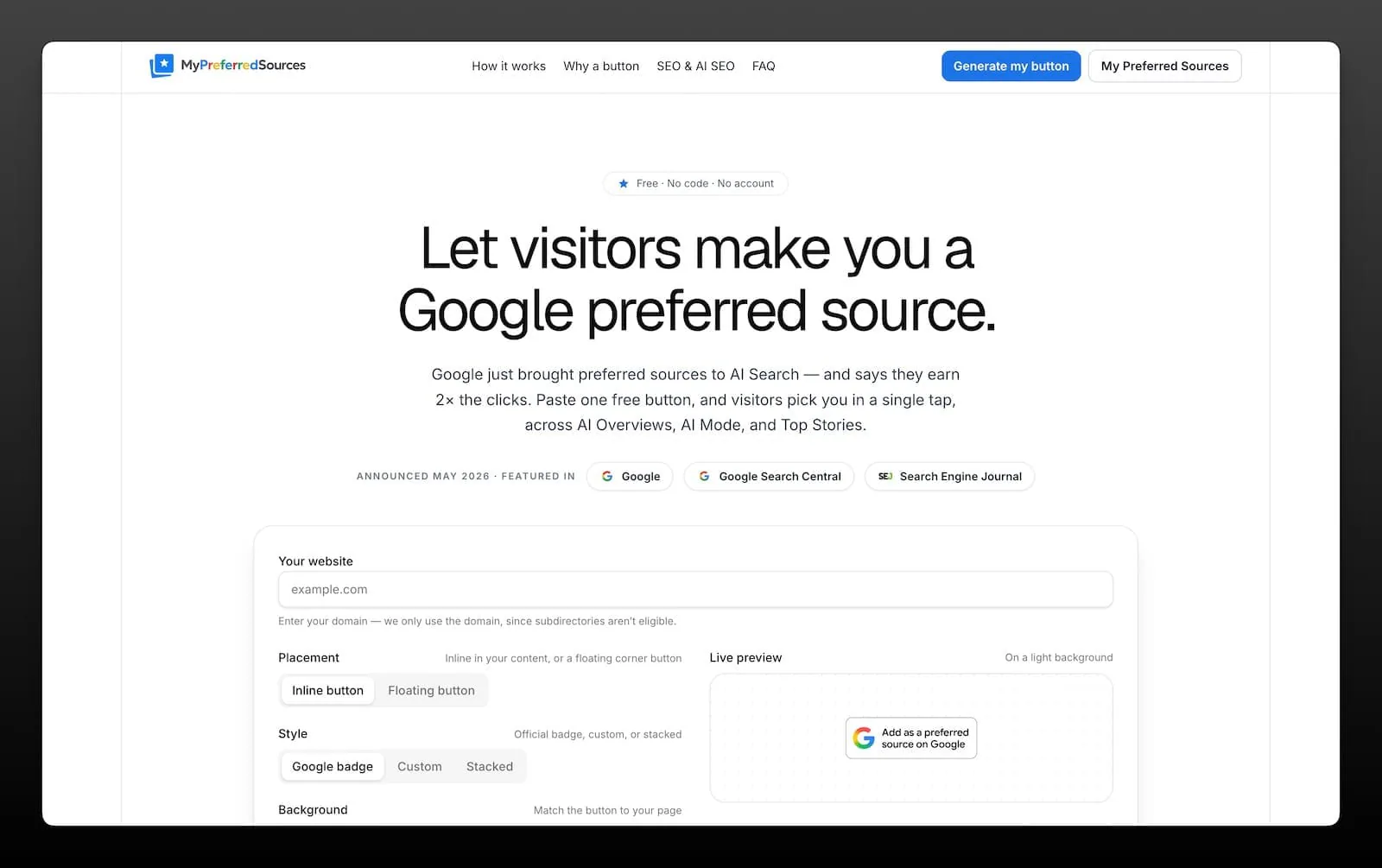
If you're taking the deeplink route, MyPreferredSources builds the whole snippet for you — badge image, correct URL, right language — instead of leaving you to unzip Google's asset pack and hand-assemble an anchor tag. It's free, needs no account, and produces exactly the deeplink format Google documents. (It's an independent tool — not affiliated with or endorsed by Google.) Three steps:
1. Enter your domain. Type your URL. The tool builds the official Google link and automatically strips paths, query strings, and a leading www., because Google matches preferred sources at the domain level (example.com or news.example.com — not example.com/blog).
2. Make it yours. Choose light or dark to match your page, pick a size, and set the language — the tool ships official badges in English, Turkish, German, French, Spanish, Portuguese, and more. The live preview is byte-for-byte what you'll copy.
3. Paste it anywhere. Drop the HTML where your readers already are — right beside your social and share buttons works well. Or share the raw link in a post or newsletter.
The generated embed looks like this:
<a href="https://www.google.com/preferences/source?q=example.com" target="_blank" rel="noopener">
  <img src="https://mypreferredsources.com/badges/en-light@2x.png"
       alt="Add as a preferred source"
       width="152" height="48"
       style="display:block;height:48px;width:auto;border:0">
</a>
Swap in your own embed from the generator, paste it into a Ghost HTML card (or your theme), and you're done. If your site can run Google's script, run Google's script instead — the return-to-page behavior is worth more than a prettier setup flow.
Who should add this now
If readers already come back for your work, give them a one-tap way to tell Google — and its AI answers — to show them more of it:
- News publishers competing for the badge in Top Stories.
- Independent blogs with a small, devoted readership.
- Niche and industry sites that want to be the default name in their category.
- Creators and newsletters turning an audience into durable distribution across Search and AI.
- Local news staying top-of-mind in the community's results.
You don't need a huge following. You need the readers you have to be able to vouch for you without hunting through settings.
Why I built MyPreferredSources.com
I'm Emre Elbeyoglu, and I built this tool because I kept running into the same wall.
When Google moved Preferred Sources into AI answers in May, I read the announcement and thought: this is the first lever in years that rewards loyalty instead of chasing the algorithm. Then I tried to actually use it and I had to dig through a settings menu, search for a site by name, and tick a box. I knew right away that almost none of my readers would ever do that, no matter how much they liked my work. The feature was real, but the friction was killing it.
So I made the thing I wanted to exist: a single button that opens Google's own tool with the site already loaded, so a reader can vouch for you in one tap. I kept it free and account-free on purpose. I don't think you should have to pay to let your audience tell Google they trust you and frankly, the more sites that use it, the more normal the "add me as a preferred source" button becomes for everyone.
In August, Google shipped its own version — and it's better than mine, because it can do something a link never could: return the reader to your page instead of leaving them in Search settings. That's the right outcome. Use Google's button if you can. Mine is still there for the sites that can't run the script, and for the newsletters and social posts where a script tag was never an option.
I'm not affiliated with Google, and I won't pretend a button guarantees you anything. What it does is remove the one step that was quietly costing you picks. If your readers already come back for you, give them the easy yes.
The short version
Google moved Preferred Sources into AI Overviews and AI Mode on May 27, 2026, then shipped an official embeddable button on August 20. A reader's pick badges and lifts your stories across Top Stories and AI answers, Google's own data puts the lift at roughly 2× the clicks, and picks have passed 600,000 sources. Two lines of HTML now stand between you and the ask.
Add Google's official button → Or generate a deeplink badge if your CMS won't run the script. Your readers are one tap from choosing you.
Google Preferred Sources FAQ
What are Google Preferred Sources? It's a Google Search setting that lets a reader choose the sites they want to see more of. Once someone picks you, your fresh articles appear more prominently for them and carry a visible "preferred" badge — now across Top Stories, AI Mode, and AI Overviews.
What changed in August 2026? On August 20, 2026, Google released an official "Preferred Sources" button that publishers can embed in two lines of HTML. Tapping it adds your site and returns the reader to the page they were reading. Google also said picks had passed 600,000 unique sources, and announced plain-language topic controls for Discover plus customizable audio briefings in the Google News app on Android.
What changed in May 2026? On May 27, 2026, Google moved Preferred Sources into its AI answers. Before that, the badge only appeared in Top Stories. Now links from a reader's chosen sites can be flagged inside AI Overviews and AI Mode too. Google said readers had selected more than 345,000 unique sources by then.
How do I add the official button?
Load https://news.google.com/swg/js/v1/publisher.js with an async script tag, preferably in your <head>, then place <div google-add-preferred-source-btn></div> wherever you want the button. It auto-translates to the reader's language. Add data-theme="dark" or data-lang="en" to override the defaults.
Do preferred sources really get 2× the clicks? That's Google's own figure it says readers are about twice as likely to click a link from a source they've preferred. Google hasn't published independent verification, so treat it as a strong directional signal rather than a guarantee.
Button or deeplink — which should I use?
The button, whenever your site can run the script. It's Google's recommendation, and it sends the reader back to your page after they confirm. Use the deeplink (https://www.google.com/preferences/source?q=example.com) when JavaScript isn't an option — a restrictive CMS — or when the link has to live in a newsletter or a social post.
How do my readers pick me by hand? They can tap the star on a Top Stories header during a news search, or go to their Google profile → Search personalization → Source preferences and add you there. Most people will never do either, which is the point of putting a button on your own page.
Does choosing me in Top Stories also affect AI Mode? Yes. A reader's preferences apply across surfaces. Picking you in Top Stories also tailors their AI Mode and AI Overviews, and choosing you in Source preferences also shapes Top Stories. One pick covers everything.
Is my site eligible?
Eligibility is at the domain or subdomain level — for example example.com or news.example.com, but not example.com/blog. Check by entering your site in Google's source preferences tool: if it appears there, you're eligible. Sites that rarely publish fresh content may not show up in the picker.
Where is the feature available? Top Stories preferred sources run globally, in every language Google Search supports. The AI Mode and AI Overviews badges appear in all languages and locales where those two features are themselves available.
Does adding a button guarantee I'll show up in AI answers? No. It only makes it effortless for your readers to choose you. Google's John Mueller has clarified the feature works alongside ranking systems rather than overriding them, so a pick tilts the odds with the readers who chose you — it doesn't suspend the rules.
Is MyPreferredSources an official Google tool? No. It's an independent, free tool that builds links using Google's publicly documented deeplink format. It isn't affiliated with or endorsed by Google. Google's own button and badge assets come from Search Central.
Which languages does the button support?
Google's official button translates itself based on the reader's browser language, and you can pin it with data-lang. Google also publishes a downloadable badge pack covering every supported language for static implementations.
Does it cost anything? No — Google's button is free, and so is the badge generator. Neither needs an account or sign-up.