
What Is markdown.new and How Does It Convert Any URL into Clean Markdown?
See how markdown.new turns webpages and common file formats into clean, AI-ready Markdown with a Cloudflare-based fallback system and no API key.
Published Updated 8 min read

Founder, GrowthMarketing.ai
15+ years of experience
Emre Elbeyoglu is a B2B SaaS growth expert and Founder of GrowthMarketing.ai. With 15+ years of SEO and GEO experience, he studies search and AI ranking systems to support growth work for brands including Rakuten and Investing.com. He has also bootstrapped SaaS products including Popupsmart and LiveChatAI.
- Computer Technology & Information Systems, Bilkent University
- Co-founder & Growth Lead, Popupsmart (since 2019)
- Co-founder, LiveChatAI (since 2023)
Share article
Explore with AI
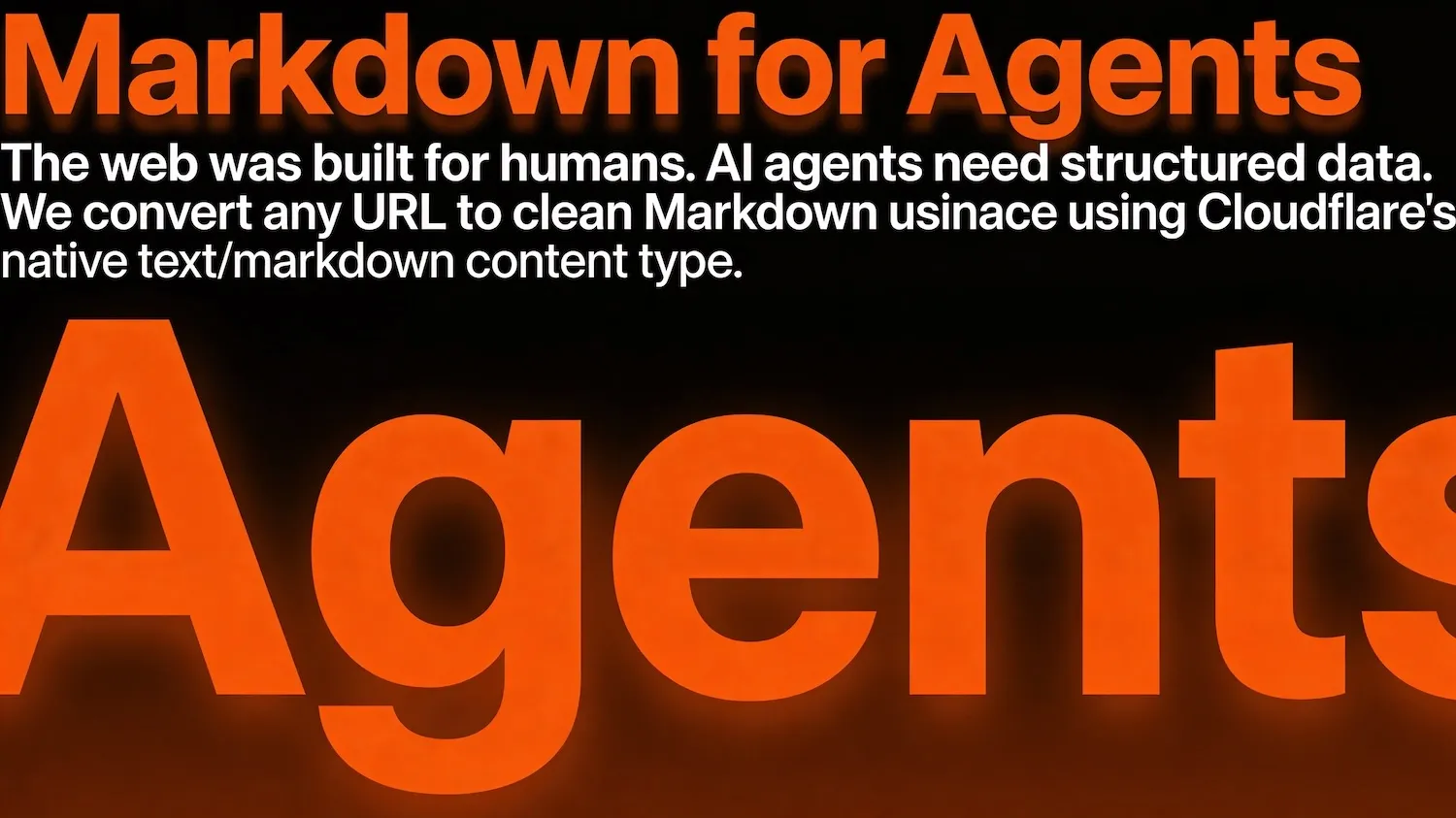
markdown.new is a free service that converts any URL or file into clean, structured Markdown. Just prepend markdown.new/ to any web address.
It uses a three-tier Cloudflare-powered system: native content negotiation first, then Workers AI conversion, then headless browser rendering as a final fallback. Every request gets the best possible Markdown with up to 80% fewer tokens than raw HTML.
Prepend markdown.new/ to any URL in your browser for instant conversionhttps://markdown.new/any-url-here
I built https://t.co/TegRO9wVZF
— Emre Elbeyoglu (@elbeyoglu) February 14, 2026
Put https://t.co/aJjJVn3uHO before any URL → get clean Markdown back.
Cloudflare's Markdown for Agents is great, but only works for enabled sites. https://t.co/TegRO9wVZF works for ANY website on the internet.
80% fewer tokens. Also converts… https://t.co/ZfWGOLRUyN
It reduces token consumption by up to 80% compared to raw HTML, works for any URL regardless of whether the source site supports Markdown natively, and handles file conversions including PDFs, Word documents, images with OCR, and audio with transcription.
Time to consider not just human visitors, but to treat agents as first-class citizens. Cloudflare’s network now supports real-time content conversion to Markdown at the source using content negotiation headers.https://t.co/B7wYH4PtA8
— Cloudflare (@Cloudflare) February 12, 2026
Why Is It So Hard to Get Clean Content from the Web?
The web was built for browsers, not for reading. Whether you're an AI agent parsing pages for a RAG pipeline or a human trying to save an article as clean notes, every webpage comes wrapped in navigation bars, script tags, CSS classes, and div soup that obscure the actual content.
The math is brutal. According to Cloudflare's Markdown for Agents announcement, a simple ## About Us heading in Markdown costs roughly 3 tokens, while its HTML equivalent <h2 class="section-title" id="about">About Us</h2> burns 12–15 tokens. Cloudflare's own blog post drops from 16,180 tokens in HTML to 3,150 tokens in Markdown — an 80% reduction in token usage.
If you're building RAG pipelines, research agents, or content summarizers, this waste compounds fast. But it's not just an AI problem — anyone creating documentation, migrating content to a static site, building a knowledge base, or simply trying to save a clean copy of a web article hits the same wall. HTML is great for rendering. It's terrible for reading, storing, and reusing.
I built markdown.new to solve this problem for any URL on the internet.
How Does Cloudflare's Markdown for Agents Work?
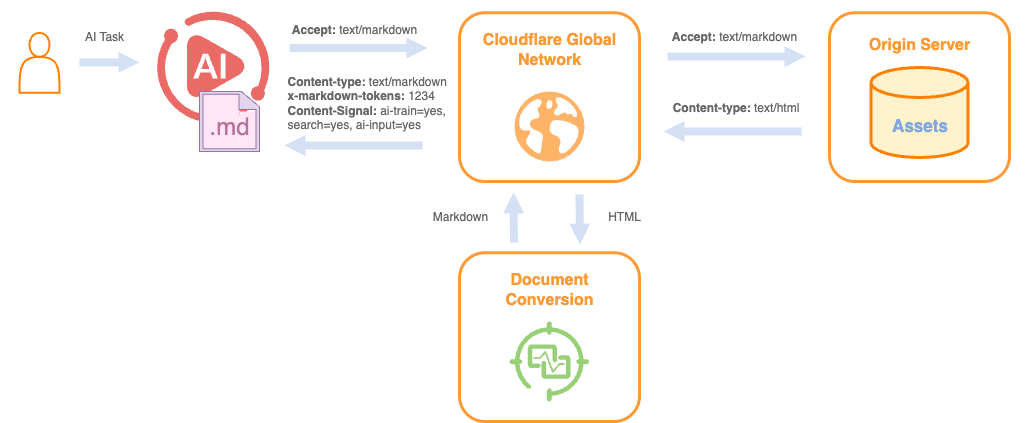
Cloudflare introduced Markdown for Agents in February 2026 — a feature that enables real-time HTML-to-Markdown conversion at the edge using content negotiation headers.
When an AI agent sends an Accept: text/markdown request to a Cloudflare-enabled site, the network converts the HTML to Markdown on the fly and returns it with two useful headers: x-markdown-tokens (estimated token count for context window budgeting) and Content-Signal (the publisher's explicit permission for AI usage under the Content Signals framework).
It's a powerful solution — but it has specific constraints:
| Limitation | Detail |
|---|---|
| Availability | Only Cloudflare zones with the feature enabled (Pro, Business, Enterprise plans) |
| Format | HTML conversion only — no PDFs, Office documents, or other file types |
| Compression | Does not support compressed responses from the origin |
| Scope | Zone-level setting only — cannot toggle per subdomain without separate zones |
| Coverage | Most websites have not enabled it yet |
These are reasonable constraints for a beta feature. But they mean most of the internet still serves raw HTML to your agents.
How Does markdown.new Convert Any URL to Markdown?
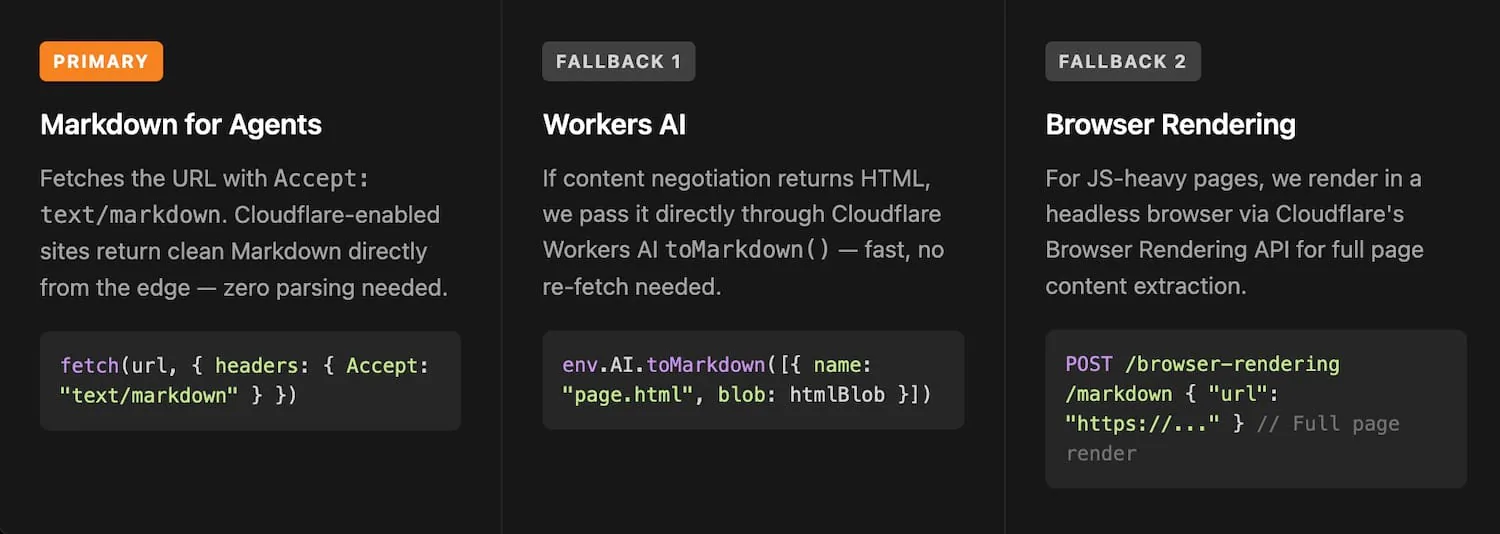
I built markdown.new to work for every URL — not just Cloudflare-enabled ones. It uses a three-tier fallback system that tries the fastest method first and degrades automatically. Your agent gets clean Markdown every time without needing to know which method was used.
Method 1: Content Negotiation (Primary — Fastest)
The first request fetches the page with an Accept: text/markdown header, the same mechanism Cloudflare's Markdown for Agents uses:
fetch(url, { headers: { Accept: "text/markdown" } })
If the target site supports content negotiation, you get Markdown straight from the edge with zero conversion overhead. This is the fastest path — the content creator defined how their page should look in Markdown, and the response includes x-markdown-tokens for context window planning and Content-Signal headers confirming AI usage permissions.
Method 2: Workers AI toMarkdown (Fallback — No Re-fetch)
When content negotiation returns HTML instead of Markdown, the response gets piped directly through Cloudflare Workers AI's toMarkdown() conversion:
env.AI.toMarkdown([{ name: "page.html", blob: htmlBlob }])
No second fetch is needed. We already have the HTML, so we convert it on the spot. Workers AI's toMarkdown() handles multiple document types and strips boilerplate while preserving semantic structure. This covers the vast majority of static sites.
Method 3: Browser Rendering (Final Fallback — JavaScript-Heavy Pages)
For SPAs and client-rendered applications where raw HTML is an empty shell with a <script> tag, we render the page in a headless browser via Cloudflare's Browser Rendering API:
POST /browser-rendering/markdown
{ "url": "https://..." }
This is the slowest path but ensures even complex JavaScript-heavy pages get properly converted.
| Method | Speed | When It's Used | Coverage |
|---|---|---|---|
| Content Negotiation | Fastest | Cloudflare sites with Markdown for Agents enabled | ~Growing adoption |
| Workers AI toMarkdown | Fast | Static HTML sites without native Markdown support | ~Most of the web |
| Browser Rendering | Slower | JavaScript-heavy SPAs and client-rendered apps | ~Everything else |
What Are the Three Ways to Use markdown.new?
You can convert any URL to Markdown in three ways, depending on your workflow:
1. Prepend to any URL in your browser:
https://markdown.new/https://example.com/any-page
2. Use the web interface at markdown.new — paste a URL or upload a file (PDF, Word, Excel, PowerPoint, images, audio) and click convert.
3. Call it programmatically from your agent or pipeline — just append the target URL. No API key, no configuration, no signup.
Why Does Markdown Matter for AI Agent Performance?
Markdown isn't just smaller than HTML. It preserves semantic structure — headings, lists, emphasis, code blocks, tables — in a format AI models process more accurately. In my experience building agent pipelines over the past year, I've found three measurable advantages.
Token efficiency directly impacts cost and context. When you're processing hundreds of URLs in a RAG pipeline, 80% fewer tokens means fitting 5x more source material into a single context window. For teams running agents at scale, this translates to significant cost savings on API calls.
Structured content produces better LLM outputs. When your agent reads ## Pricing followed by a clean Markdown table of tiers, it understands the content hierarchy far more reliably than when parsing nested <div> elements with arbitrary CSS classes. Research from Princeton and Georgia Tech's GEO study (KDD 2024) shows that structured formats like comparison tables increase AI citation likelihood by 32.5%.
Consistent input format simplifies architecture. Without markdown.new, a typical content ingestion pipeline requires Puppeteer for rendering, Beautiful Soup for HTML stripping, custom regex for cleanup, and separate handlers for PDFs and documents. markdown.new collapses that entire stack into a single URL prepend.
What File Types Can markdown.new Convert Beyond URLs?
The URL-to-Markdown conversion is the primary feature, but markdown.new also handles file uploads through the web interface:
| File Type | Conversion Method |
|---|---|
| PDF documents | Text extraction with heading and formatting preservation |
| Word documents (.docx) | Structured Markdown with heading hierarchy |
| Excel spreadsheets (.xlsx) | Table-formatted Markdown |
| PowerPoint (.pptx) | Slide-by-slide Markdown extraction |
| Images (PNG, JPG) | OCR text extraction to Markdown |
| Audio files | Transcription to Markdown |
I added OCR and audio transcription because I kept needing them in my own agent workflows — a support bot reading uploaded PDFs, a research assistant ingesting papers, a meeting summarizer processing recordings. One converter handles all of it.
How Does markdown.new Fit into the AI-Ready Web?
Cloudflare's Markdown for Agents announcement signals an industry shift. Content negotiation via Accept: text/markdown is becoming a standard protocol, and the Content Signals framework gives publishers explicit control over AI usage rights. Coding agents like Claude Code and OpenCode already send these accept headers with their requests.
But we're in a transition period. Most websites haven't enabled Markdown for Agents. Most don't even run on Cloudflare. The gap between "where the web is going" and "where the web is today" is exactly what markdown.new fills.
It takes advantage of native Markdown support when available (Method 1), handles standard HTML sites efficiently (Method 2), and renders JavaScript-heavy pages when nothing else works (Method 3). Your agent gets consistent, clean Markdown regardless of what the source site supports.
How Do I Get Started with markdown.new?
Take any URL, prepend markdown.new/, and see the result:
https://markdown.new/https://blog.cloudflare.com/markdown-for-agents/
For programmatic use in your agent, make an HTTP request with the target URL appended. For file conversions, use the web interface at markdown.new.
No API key. No signup. No configuration. The web was built for browsers. Markdown is built for agents. And markdown.new is the bridge that lets your agent read the whole web — not just the parts that have caught up yet.
Try it now at markdown.new — convert any URL to AI-ready Markdown in seconds.